Pain Point
Slack only pastes rich formatting when the clipboard advertises text/html, otherwise it treats everything as plain text.
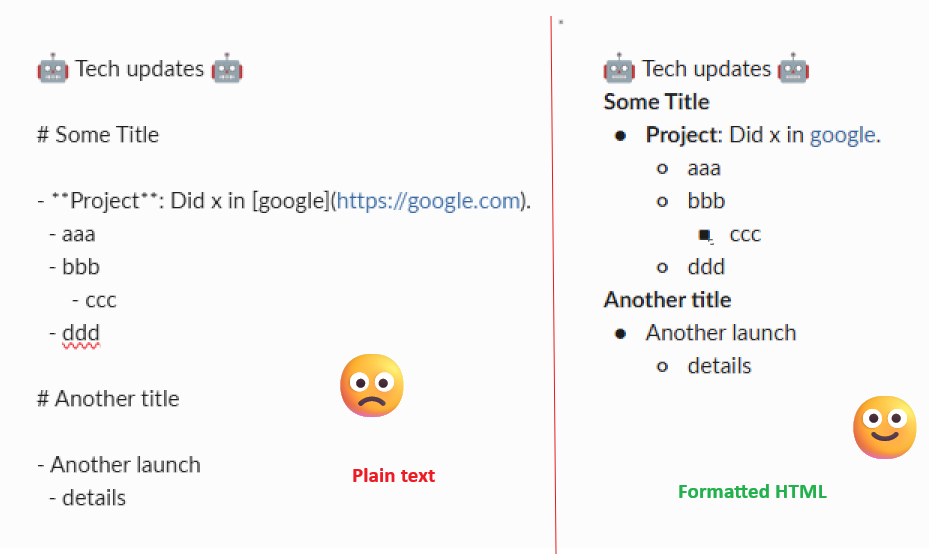
If my file sample.md looks like this:
:robot_face: Tech updates :robot_face:

# Some Title

- **Project**: Did x in [google](https://google.com).
  - aaa
  - bbb
      - ccc
  - ddd

# Another title

- Another launch
  - details
Compare pasting directly on the left and what we want on the right.
Solution
Put HTML onto the clipboard the same way a browser would, so Slack pastes it as rich content instead of plain text.
This requires a recent xclip build that supports advertising text/html correctly.
- Build xclip from source to get the latest features around html
pip install beautifulsoup4 lxml- Run
pandoc sample.md -t html - Optionally modify the HTML to fix things like lists.
- and pipe it to
xclip -selection clipboard -t text/html
What it looks like:
pandoc -f gfm -t html sample.md \
| python -c '
import sys
from bs4 import BeautifulSoup as BS, Tag
s = BS(sys.stdin.read(), "lxml")
def inline_html(tag: Tag) -> str:
return "".join(str(x) for x in tag.contents).strip()
out_lines = []
def emit_block(tag: Tag):
name = tag.name.lower()
if name in ("h1","h2","h3","h4","h5","h6"):
txt = tag.get_text(strip=True)
if txt:
out_lines.append(f"<strong>{txt}</strong>")
out_lines.append("<br/>")
return
if name in ("p",):
txt = inline_html(tag)
if txt:
out_lines.append(txt)
out_lines.append("<br/>")
return
if name in ("ul","ol"):
walk_list(tag, 0)
out_lines.append("<br/>")
return
def walk_list(lst: Tag, level: int):
for li in lst.find_all("li", recursive=False):
# separate nested lists
nested = [c for c in li.find_all(["ul","ol"], recursive=False)]
for n in nested:
n.extract()
text = inline_html(li)
if text:
indent = " " * (4 * level) # 4 = indent width per level
bullet = "•" # •
out_lines.append(f"{indent}{bullet} {text}<br/>")
for n in nested:
walk_list(n, level + 1)
body = s.body if s.body else s
for child in list(body.children):
if isinstance(child, Tag):
emit_block(child)
print("".join(out_lines), end="")
' \
| xclip -sel clipboard -t text/html -alt-text "Updates"Note: The Python step is only needed if you want to fix Slack’s broken handling of nested lists. For simple formatting (bold, links, headings), Pandoc -> xclip alone is enough.
Inspiration
Authoring Markdown externally and pasting the ‘pretty’ output into Slack (on Linux) does the same thing without the extra formatting to fix the nested lists.
Annex
How to build latest xclip from source in Ubuntu
sudo apt install autoconf automake libtool libxmu-dev
git clone https://github.com/astrand/xclip
cd xclip
autoreconf -fi
./configure --prefix=/usr/local
make
sudo make install
WSL and powershell are different beasts
This won’t work on WSL and slack as-is. You likely need to do it from powershell using a third-party program
WSL cannot directly populate the Windows clipboard with rich HTML in a way Slack accepts; an intermediate Windows application re-copies the content with additional clipboard formats.
- Powershell 5
Get-Content out.html -Raw | Set-Clipboard -AsHtml- Open LibreOffice Writer or any GUI and paste.
- Select that and copy
- Paste into slack