flowchart TD
    start("I want to share a game to teach")
    describe{"Can I describe the game? Intent"}
    tell_ai("Tell the AI to create game")
    explain("Explain it to the AI and play up scenarios that you had")
    iterate["Iterate asking for changes"]
    client_only{"Only client side?"}
    firebase[/Firebase/]
    publish("Publish to easy app")

    start --> describe
    describe -- yes --> tell_ai
    describe -- no --> explain
    explain --> describe
    tell_ai --> iterate
    iterate --> iterate
    iterate --> client_only
    client_only -- yes --> publish
    client_only -- no --> firebase
    firebase --> publish
I like sketching on an Onyx Boox. Diagrams, flowcharts and rough system designs can go here as freehand ink.
What I do not like is transcribing or re-drawing in a diagramming tool. It’s wasteful and, as I often say, if something is annoying and you do it often, there’s probably a better way.
Text is something agents and humans can both read, and is easy to store in source control. So I built an Agent Skill to do the conversion.
Note
I show you this, not so you necessarily use this, but so you get a sense of how easy it is to apply this same methodology to your own pain points. Michael Kennedy from Talk Python to me called it hyper-personal software.
The Skill
sketch-to-text takes a handwritten PDF or image and converts it into a Quarto .qmd file with Mermaid diagrams. The output renders, links, and lives with the rest of my writing.
Here’s one of my sketches converted (original PDF):
That came from telling Claude: “convert diagram-1.pdf to quarto”.
How I built it
Rubber duck first
I didn’t start by building anything, I started by complaining about what was annoying to an LLM and thinking through what a good solution would look like.1
I went through the Boox sync options: BOOXDrop, WebDAV, Obsidian, the various export formats (vector PDF, bitmap PDF, .note) that appear in the UI. Most had friction or lock-in I didn’t want. Then, as a test, I drew a quick diagram and asked the LLM to convert it to Mermaid.
It worked well enough to make the skill idea feel viable. I decided Quarto as a destination and any agent CLI as a runner were both fine, and that my only real work would be building good enough ground truth to test against.2
Talk, then build
Once I knew what I wanted, I described it to my agent and let it write the skill. The skill’s flow is: read → classify → extract structure → generate Mermaid → self-check → write. I didn’t have to think about it that much. I was already drawing a few more diagrams to build the ground truth.
Polish with evals
After I had 6 diagrams (with rushed handwritten that proved hard to read, even for myself) I converted them into the baseline quarto files and manually compared actual vs expected respectively.
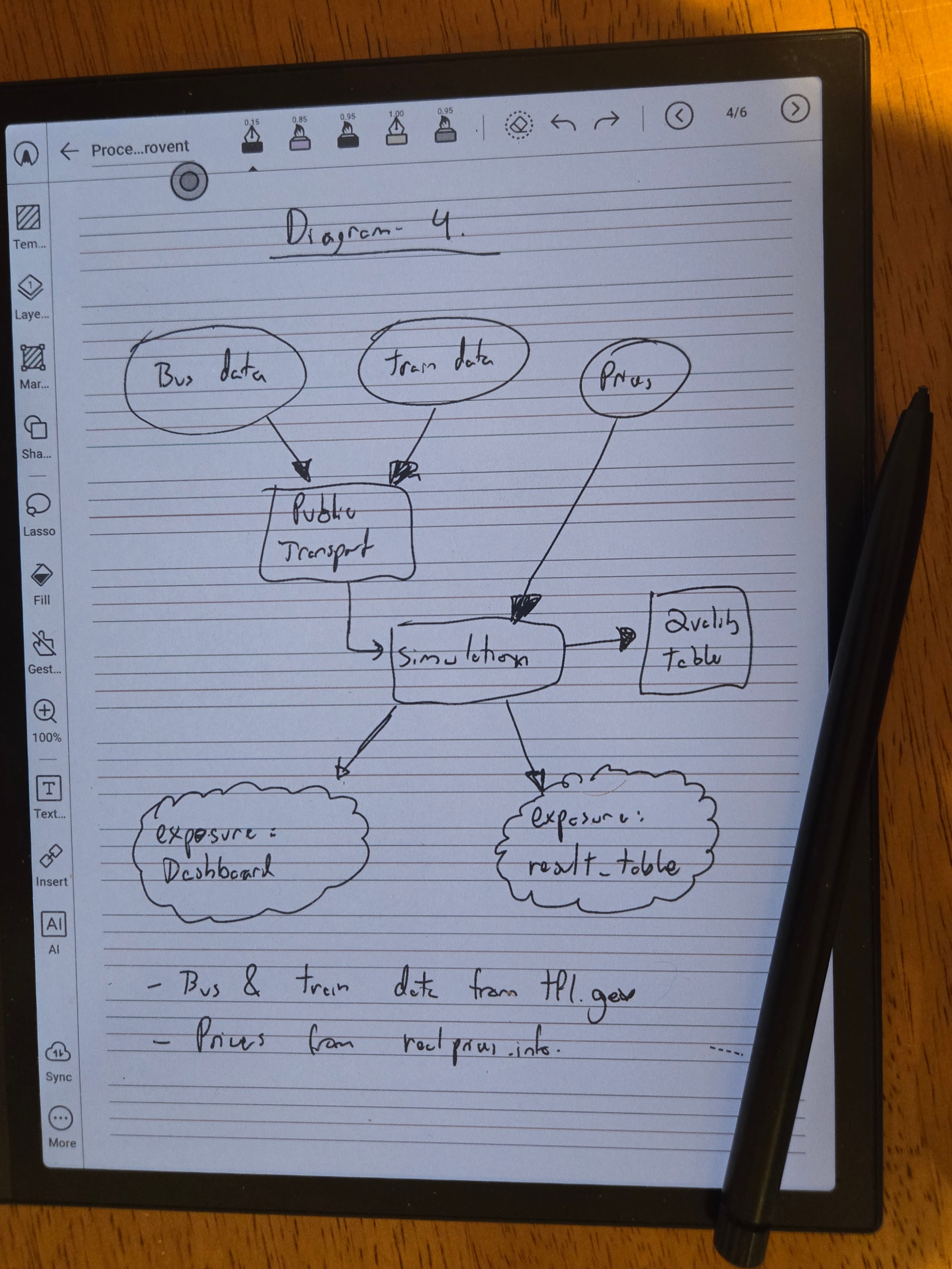
This exposed issues fast and forced me to decide details that were hard to foresee upfront. Cloud shapes, for example, aren’t implemented in Quarto’s bundled Mermaid renderer. When I hit that in diagram 4, I had to decide what to do with @{ shape: cloud } which is newer Mermaid and unsupported, and opted for ((("text"))) since it’s supported, and the double circle is visually impactful and also represents a “Stop Point”.
flowchart TD
    bus(("Bus data"))
    tram(("Tram data"))
    prices(("Prices"))
    pt["Public Transport"]
    sim["Simulation"]
    qt["Quality Table"]
    dash((("exposure: Dashboard")))
    result((("exposure: result_table")))

    bus --> pt
    tram --> pt
    prices --> sim
    pt --> sim
    sim --> qt
    sim --> dash
    sim --> result
For each issue I found, I iterated with the agent and it updated the skill. The loop is simple: try on real input, see what breaks, make the decision explicit, validate.
Note
When building ground truth you’re allowed to change the data, the expected output, and/or the skill logic. Whatever works to get a baseline that’s honest and easy to iterate against.
With ground truth in place, I ran promptfoo3 evals: each diagram PDF went through the skill, the output was checked against the reference via deterministic checks whenever I could (icontains assertions) and LLM as a Judge with local deepseek-r1:14b elsewhere. The exact tool used is really not the important part.
One run I got 5/6 since Diagram 5 had failed. The skill dropped the edge labels on the three branches.
flowchart TD
    banner["Design, De-Risk & Jumpstart"]
    intent["Intent"]
    goals["`Reduce effort
      Increase ROI
      Fail fast`"]
    guardrails["Guardrails"]

    banner -- Design --> intent
    banner -- De-Risk --> goals
    banner -- Jumpstart --> guardrails
The fix was one line in SKILL.md to preserve every label written on or beside an arrow; a labelled arrow must use -- label --> not bare -->. I re run for a 6/6 outcome. I didn’t edit the skill manually. It was all conversation.
A failing eval tells you exactly what the skill missed. One quick instruction to the agent, a re-run, and you know it holds.
Why the evals matter more than the skill
The skill is useful immediatly but the evals are what make it safe and easy to change weeks later when you don’t remember any of the details.
sketch-to-text handles flowcharts well for what I tested and is harmless enough to use whenever. If I notice inaccuracies, I can figure out whether the problem is in the source file, the skill logic, or the model. Fix it, add the new case to the evals, and catch future regressions. If I want to expand it, I’ll know I haven’t broken anything for my existing cases.
The investment is a bit of ground truth up front, in exchange for confidence on every future change.
Note
The eval inputs and ground truth files are co-located with the skill for now while the right distribution format for Agent Skill evals is still being worked out. See the evals README.
Links
Footnotes
Rubber duck debugging is the practice of explaining a problem out loud (originally to a rubber duck) to clarify your own thinking before asking for help. Popularised by Hunt and Thomas in The Pragmatic Programmer.↩︎
Ground truth is a manually verified reference output used to measure whether a system is working correctly. In evals, it’s the answer you’d accept if a human did the task well.↩︎
Promptfoo is one of several open-source eval frameworks. See ai-evals.io/tools/compare for a comparison of the main options.↩︎